

Overview of doPDF
doPDF Free Download For Windows is a software that lets you create PDF files from any document on your Windows computer. It works like a virtual printer, which means you can “print” from any program to create a PDF instead of a paper copy. The software installs on your computer and appears in your printer list. You can use it with Microsoft Word, Excel, web browsers, or any other program that has a print option.
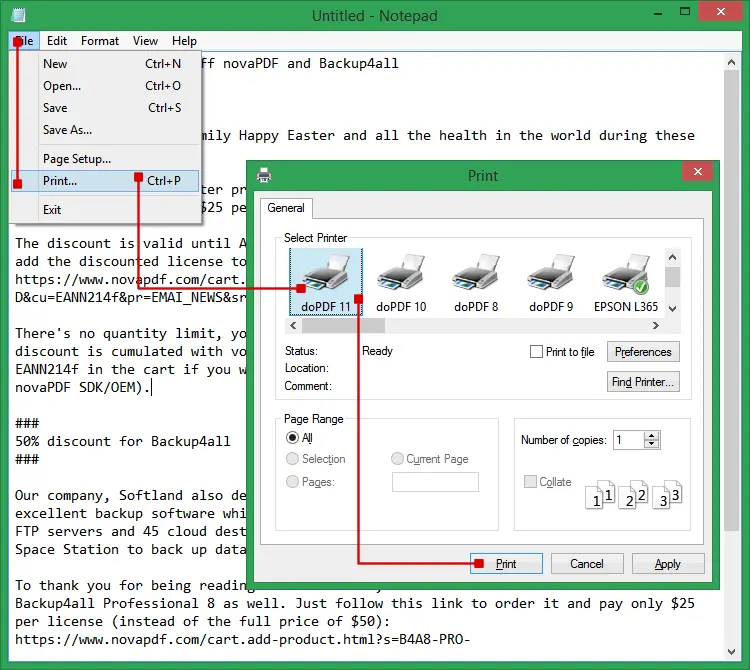
Once installed, you simply open your document, click print, select doPDF as your printer, and save the file as a PDF. The software is free for both personal and business use, making it accessible to students, office workers, home users, and small businesses who need to create PDF files regularly. The main problem doPDF solves is the need to share documents in a format that everyone can open and read exactly as you intended. When you send a Word document to someone, they might not have the same fonts installed, or they might use different software that changes how your document looks.
PDF files look the same on every device and operating system. doPDF also helps when you need to send professional-looking documents that cannot be easily edited, like resumes, invoices, or reports. Instead of buying expensive PDF creation software or subscribing to online services, doPDF gives you a simple, free way to convert any printable document into a PDF. This is especially useful for people who need to create PDFs occasionally but don’t want to pay for premium software or deal with complicated conversion tools.
Best Features of doPDF
- You can create PDF files from any Windows program that has a print button or menu option.
- The software installs as a virtual printer on your computer so you can access it from anywhere you normally print.
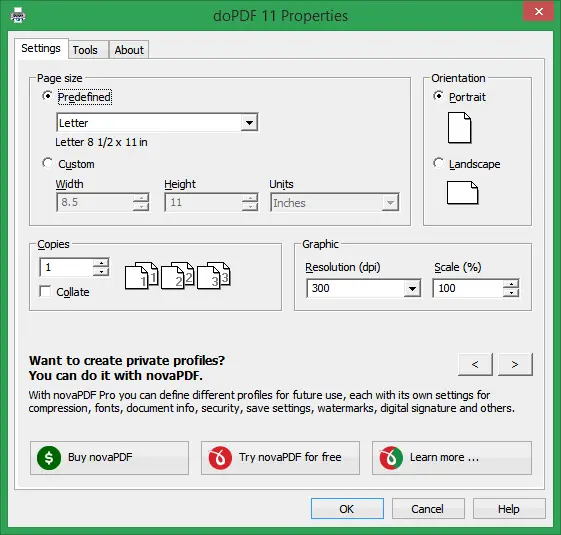
- You can choose the quality of your PDF file to make smaller files for emails or larger files with better image clarity.
- The program lets you pick where to save your new PDF file and what name to give it before creating the document.
- You can convert documents from Microsoft Word, Excel, PowerPoint, and many other programs into PDF format without opening extra software.
- The software works with web browsers so you can save web pages as PDF files directly from your browser’s print menu.
- You can protect your PDF files by adding passwords so only people who know the password can open them.
- The program supports different page sizes including letter, legal, and custom sizes to match your document needs.
- You can merge multiple print jobs into one single PDF file by selecting the right options during printing.
- The software creates searchable PDF files so people can use the find function to locate specific words in your document.
- You can share the PDF files you create with anyone because PDF readers are free and work on all computers and phones.
- The program uses very little space on your hard drive and runs quietly in the background without slowing down your computer.
- You can adjust resolution settings to balance between file size and image quality based on your specific needs.
System Requirements
- Works with Windows 11, Windows 10, Windows 8, Windows 7, Windows Vista, and Windows XP operating systems.
- Requires at least 10 MB of free hard disk space for installation.
- Needs a minimum of 128 MB RAM to run smoothly on your computer.
- Compatible with both 32-bit and 64-bit versions of Windows.
- Requires administrative rights on your computer to install the software.
- Works with any program that has print capability installed on your Windows PC.
- Needs an active internet connection only for downloading the installer file.
Technical Details
- Software name is doPDF and the current version is regularly updated by the developers.
- The installer file size is approximately 2 to 3 MB for quick downloading.
- Developed and maintained by Softland, a software company that focuses on PDF tools.
- Available as a completely free download with no trial period or premium version required.
- Installs as a printer driver that integrates directly into your Windows print system.
- Supports multiple languages including English, Spanish, French, German, and many others.
- Creates PDF files that follow the standard PDF format compatible with all PDF readers.
- Does not require Adobe Acrobat or any other PDF software to be installed on your computer.
How to Download and Install doPDF?
- Click the download button on the homepage to save the installer file to your computer.
- Find the downloaded file in your downloads folder and double-click it to start installation.
- Follow the setup wizard by clicking next and accept the license agreement when prompted.
- Wait for the installation to complete and click finish when the process is done.
- Open any document and select doPDF from your printer list to start creating PDF files.
FAQs
doPDF is completely free for both personal and commercial use with no hidden costs, premium versions, or subscription fees required.
No, doPDF only creates PDF files from other documents and cannot convert PDF files back to editable formats like Word or Excel.
No, doPDF does not add any watermarks, logos, or branding to your PDF files, so your documents remain completely clean and professional.
Yes, doPDF is safe to download from the official website and does not contain viruses, malware, or bundled adware when downloaded from dopdf.com.