


Overview of Driver Magician Lite
Driver Magician Lite Free For Pc is a Windows utility software that helps users back up and restore device drivers on their computers. Device drivers are small programs that allow your operating system to communicate with hardware components like printers, graphics cards, sound cards, and network adapters. Driver Magician Lite scans your computer, identifies all installed drivers, and lets you save copies of them to a safe location. You can then restore these drivers if you need to reinstall Windows or if a driver gets corrupted.
Driver Magician Lite is designed for home users, IT professionals, and anyone who wants to avoid the hassle of hunting down driver files after a system crash or fresh Windows installation. The main problem Driver Magician Lite solves is the time-consuming task of finding and reinstalling drivers after formatting your computer or upgrading to a new Windows version. When you reinstall Windows, all your drivers are lost, and you typically need to visit multiple manufacturer websites to download them again.
This process can take hours and is frustrating for users who don’t know which exact driver versions they need. With Driver Magician Lite, you create a backup of all your working drivers beforehand, so you can restore them quickly in just a few clicks. This saves significant time and ensures your hardware works properly right away. Driver Magician Lite for windows is particularly useful before major system changes, hardware upgrades, or when preparing to sell or transfer a computer to someone else.
Best Features of Driver Magician Lite
- This software scans your computer and finds all the hardware parts you have installed.
- It saves copies of all your device drivers to any folder you choose on your computer.
- You can restore all your saved drivers with just one click after reinstalling Windows.
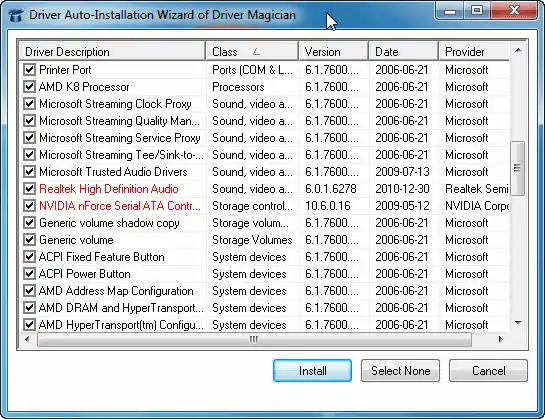
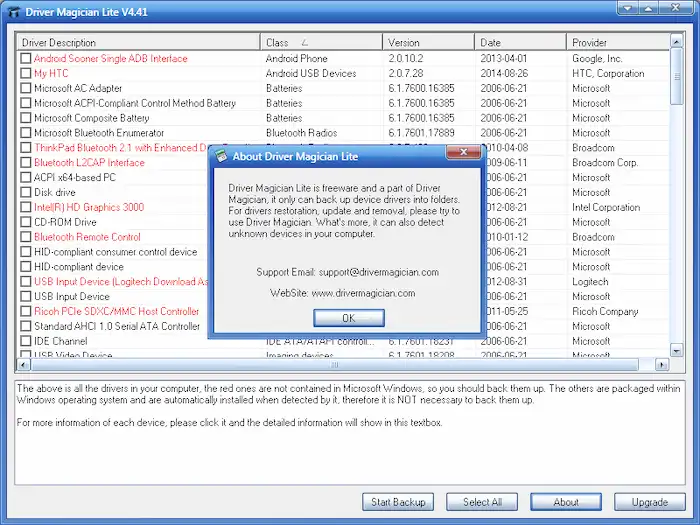
- The program shows you a complete list of drivers with their version numbers and dates.
- It displays important driver details like the company that made it and when it was created.
- The software marks drivers in red color that do not come with Windows so you know which ones to save.
- You can use the portable version without installing anything on your computer.
- It gives you detailed information about each driver when you click on it in the list.
- The program connects to the internet and downloads a database of the latest driver updates.
- It helps you find and identify unknown devices on your computer using its built-in database.
- You can back up your drivers to regular folders for safe keeping and easy access.
- The software works on all Windows versions including Windows 7, 8, 10, and 11.
- It saves you time by keeping all your drivers in one safe place for future use.
- The program is completely free to download and use without any payment required.
System Requirements
- Works on Windows 7, Windows 8, Windows 8.1, Windows 10, and Windows 11 operating systems.
- Supports both 32-bit and 64-bit versions of Windows.
- Requires only 4.5 MB of free hard disk space for installation.
- Needs a minimum of 32 MB RAM to run smoothly.
- Works on computers with Pentium 166 MHz processor or better.
- Requires at least 10 MB of additional hard disk space for driver backup storage.
- Internet connection is optional but helpful for downloading driver updates.
- No special graphics card or high-end hardware needed to use this software.
Technical Details
- Software Name: Driver Magician Lite
- Latest Version: 5.77
- Developer: GoldSolution Software, Inc.
- License Type: Freeware (completely free to use)
- File Size: 4.5 MB (installer version)
- Available Language: English
- Software Category: System Utilities and Backup Tools
- Release Date: Updated regularly since 2007
- Portable Version: Available (1.0 MB file size, runs without installation)
- Installation Required: Optional (you can use the portable version instead)
- Compatible Architectures: 32-bit and 64-bit systems
- Update Method: Manual download from official website or trusted software sites
How to Download and Install Driver Magician Lite?
- Click the download button to save the Driver Magician Lite installer file to your computer.
- Find the downloaded file in your Downloads folder and double-click it to start the installation.
- Follow the simple setup wizard by clicking Next and accept the license agreement when asked.
- Choose the folder where you want to install the program or keep the default location.
- Click Install and wait for a few seconds until the installation completes, then click Finish to launch the software.
Final Words
Driver Magician Lite latest version is a simple and useful tool for anyone who wants to protect their computer drivers. This free software saves you hours of work when you need to reinstall Windows or fix driver problems. It works well on all modern Windows computers and requires very little space. The program is easy to use, even if you are not a computer expert.
You just scan, backup, and restore your drivers whenever needed. Driver Magician Lite is especially helpful before upgrading your operating system or formatting your hard drive. While it may not have all the advanced features of paid versions, the free Lite version offers everything most home users need. Overall, Driver Magician Lite is a reliable and practical solution that makes driver management much easier for everyone.
Frequently Asked Questions
Yes, Driver Magician Lite is completely free software with no hidden costs or trial periods that expire.
Driver Magician Lite is safe and legitimate software from GoldSolution Software Inc., and trusted download sites verify it contains no viruses or malware.
The Lite version only backs up drivers to folders, while the full paid version adds driver updates, removal tools, unknown device detection, and the ability to create auto-install packages.
No, the Lite version only backs up and restores drivers; you need the paid full version of Driver Magician to download and install driver updates.