

Overview of Zorin OS 18
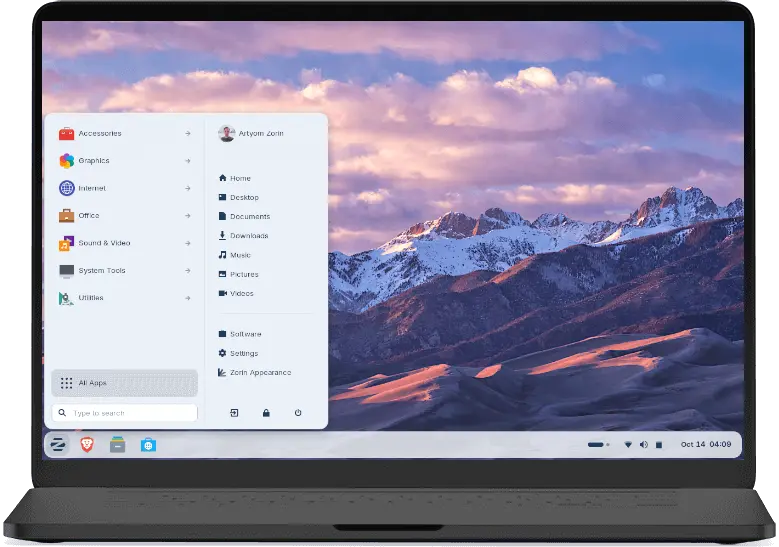
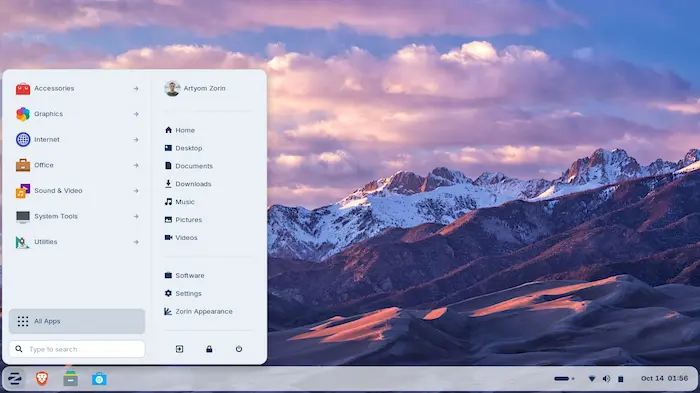
Zorin OS 18 Latest Version is a free, Linux-based operating system released on October 14, 2025. It is built on Ubuntu 24.04 LTS and powered by Linux kernel 6.14. It looks and feels similar to Windows, which makes it easy for everyday users to get started without much learning. The desktop has a clean, modern design with a floating panel, rounded corners, and smooth animations. It comes with useful apps like LibreOffice, GIMP, and VLC right out of the box.
It also supports OneDrive, window tiling for better multitasking, and a Web Apps tool that lets users turn websites like Google Docs or Microsoft Office into desktop-like apps. There are two versions available: a free Core edition and a paid Pro edition at around $48, which unlocks extra layouts and additional software. Zorin OS 18 free for pc solves a very real and urgent problem. Windows 10 reached its end of life on October 14, 2025, leaving around 240 million older PCs without security updates or support.
Many of these computers cannot run Windows 11 because they do not meet its strict hardware requirements. Buying a new computer is not always an option for everyone, especially students, families, and people on a tight budget. Zorin OS 18 free for windows gives these users a safe and modern alternative without needing new hardware. It runs well on older machines, keeps personal data private, receives security updates until at least April 2029, and even helps users find Linux alternatives when they try to install a Windows program.
Best Features of Zorin OS 18
- Zorin OS 18 gives your old computer a fresh start without needing any expensive hardware upgrades.
- It copies the Windows layout so you can start using it right away without learning anything new.
- The system runs smoothly on low-power and aging computers that cannot handle Windows 11.
- Zorin OS 18 keeps your personal data safe because it does not collect or sell your information.
- It connects directly to your OneDrive account so you can access all your saved files easily.
- The built-in Web Apps tool turns websites like Google Docs into desktop apps you can open anytime.
- It comes with LibreOffice, VLC, GIMP, and other useful apps ready to use from day one.
- The window tiling feature lets you snap and organize multiple apps on your screen at the same time.
- Zorin OS 18 detects Windows programs and suggests free Linux alternatives you can install instead.
- The operating system receives full security updates and support until at least April 2029.
- It offers a clean, modern desktop with smooth animations, rounded corners, and a floating taskbar.
- You can switch between different desktop layouts to match the look you feel most comfortable with.
- The Pro version gives you extra layouts, premium apps, and professional tools for a one-time payment.
- Zorin OS 18 installs quickly and works right away, even for people who have never used Linux before.
System Requirements
- Processor: 1 GHz Dual-Core 64-bit Intel or AMD processor (2 GHz or faster recommended)
- RAM: 2 GB minimum (4 GB recommended for smooth performance)
- Storage: At least 15 GB of free disk space for installation
- Display: 800 × 600 pixel screen resolution or higher
- Internet: An internet connection helps during setup for updates and extra apps
- Boot Media: A USB flash drive (4 GB or larger) to create an install drive
- Compatibility: Works on computers up to 15 years old without major issues
- Mac Support: Most Intel-based Mac computers run Zorin OS 18 without problems
Technical Details
- Release Date: October 14, 2025
- Base System: Built on Ubuntu 24.04 LTS for long-term stability
- Linux Kernel: Powered by Linux Kernel 6.14 for better hardware support
- Support Period: Receives security updates and bug fixes until at least June 2029
- Desktop Environment: Uses a customized GNOME desktop with a floating, rounded panel
- App Compatibility: Supports .deb, .AppImage, Flatpak, and Snap app formats
- Windows App Support: Runs many Windows .exe and .msi programs directly
- Editions Available: Core (free) and Pro (paid, one-time fee of around $48)
- Architecture: 64-bit only; does not support 32-bit processors
- Cloud Integration: Includes built-in OneDrive support for easy file access
How to Download and Install Zorin OS 18?
- Cick on the Download button, and choose the Core (free) or Pro edition to download the ISO file.
- Download a free tool called Balena Etcher from etcher.balena.io, then plug in a USB drive (at least 4 GB) into your computer.
- Open Balena Etcher, select the Zorin OS ISO file you downloaded, choose your USB drive, and click Flash to create a bootable installer.
- Restart your computer, press the boot menu key (usually F12, F2, or Delete) during startup, and select your USB drive from the boot options list.
- When the Zorin OS screen appears, click Install Zorin OS, follow the on-screen steps, choose your language and timezone, and set up your username and password.
- Wait for the installation to finish, remove the USB drive when asked, restart your computer, and Zorin OS 18 will boot up and be ready to use.
Final Words
Zorin OS 18 is a smart and practical choice for anyone who wants to keep using their old computer safely and freely. It solves a real problem by replacing outdated Windows systems with a modern, secure, and easy-to-use alternative. Whether you are a student, a home user, or someone on a budget, this operating system gives you everything you need without spending money on new hardware.
It runs fast, looks clean, and protects your privacy every day. The free Core edition is more than enough for most users, and the Pro edition adds extra value for those who want more. If your PC still works well, Zorin OS 18 helps you get the most out of it for many more years.
People Also Ask
Yes, the Core edition of Zorin OS 18 is completely free to download and use, while the Pro edition costs a one-time fee of around $48.
Yes, Zorin OS 18 lets you run many Windows programs directly, and it also suggests free Linux alternatives when a Windows app is not compatible.
Yes, Zorin OS 18 is designed to run well on older and low-powered computers, and most users notice a clear improvement in speed after switching from Windows.
Yes, Zorin OS 18 is very beginner-friendly because it looks similar to Windows, installs quickly, and does not require any technical or Linux knowledge to use.