

What Is Obsidian?
Obsidian free latest version is a note-taking app that lets you build a “second brain” on your computer. It stores all your notes as simple text files. You can link them together like a web of ideas. Imagine you have hundreds of notes. They all feel scattered and hard to find. Obsidian fixes that. It connects your notes like dots on a map. You can see how your ideas relate to each other.
Students use it for studying. Writers use it for planning stories. Researchers use it to organize findings. And the best part? It is completely free for personal use. Unlike other apps like Notion or Evernote, Obsidian does not store your notes on a cloud server. Your notes live on your own computer. That means more privacy and faster access even without internet.
What Are the Key Details About Obsidian?
| Software Name | Obsidian |
|---|---|
| Developer | Dynalist Inc. (Shida Li & Erica Xu) |
| Initial Release Date | March 29, 2020 |
| Current Version | 1.7.7 (2025) |
| License Type | Free for Personal Use; Paid for Commercial |
| File Size | 100 MB (Windows Installer) |
| Supported Platforms | Windows 7/8/10/11, macOS 10.13+, Linux, Android, iOS |
| Language Support | English + 20+ community languages |
| Note Format | Plain Text / Markdown (.md files) |
| Internet Required? | No — works fully offline |
| Plugin Support | Yes — 1,000+ community plugins |
| Official Website | obsidian.md |
| Category | Note-Taking / Knowledge Management / PKM Tool |
What Does Obsidian Do?
Obsidian helps you write and connect your notes. Think of it like building a personal Wikipedia just for your own thoughts and knowledge.
Top Features of Obsidian:
- Linked Notes: Connect any note to another with [[double brackets]]. Build a web of ideas.
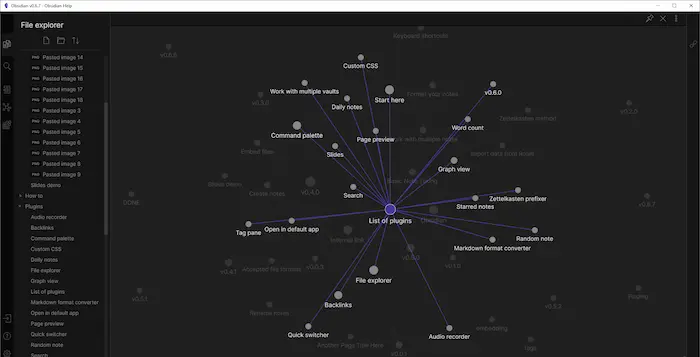
- Graph View: See all your notes as a visual map. Watch how ideas connect visually.
- Markdown Support: Use simple symbols to format your text. No complex menus needed.
- Plugins & Themes: Add 1,000+ free plugins. Change how the app looks and works.
- Daily Notes: Write a journal entry every day. Track your thoughts over time.
- Offline Access: No internet needed. Open your notes anytime, anywhere.
- Local File Storage: Your notes stay on your computer. No company reads them.
- Canvas View: Drag and arrange notes on a visual board like sticky notes.
- Search & Tags: Find any note instantly. Use tags to group related topics.
- PDF Export: Save your notes as PDF files for sharing or printing.
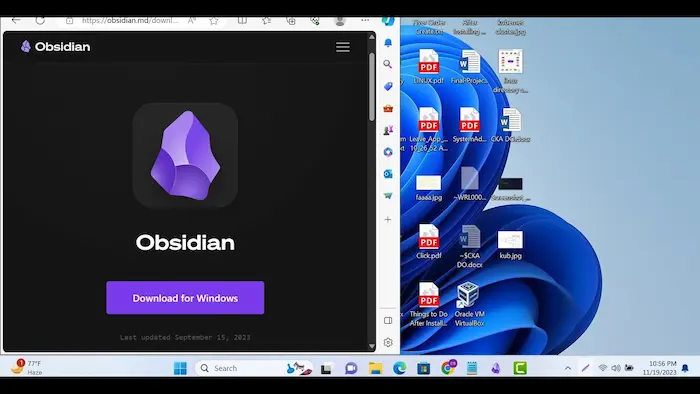
How Do You Install and Use Obsidian on PC?
Installing Obsidian is quick and easy. Follow these steps to get started in under 5 minutes:
- Click the download button.
- Run the downloaded installer file. Click Next and then Install.
- Open Obsidian after installation. It will ask you to create a Vault (your notes folder).
- Choose a folder on your PC to store your notes. Click Create.
- Start writing your first note! Click the New Note button (pencil icon).
- Type [[ and start typing a word to link to another note instantly.
- Explore Settings → Community Plugins to add extra features you like.
Why Should You Choose Obsidian Over Other Apps?
Many note apps exist. But Obsidian stands out for very clear reasons:
- It’s free: Personal use is always free. No credit card. No hidden fees.
- It respects your privacy: Your notes never leave your computer unless you choose sync.
- It’s fast: Opens instantly. Works smoothly even on older computers.
- It’s flexible: 1,000+ plugins let you build your own perfect setup.
- It grows with you: Start simple. Add more features as you learn.
- It’s future-proof: Notes are plain text. You can open them in any app forever.
What Are the Minimum and Recommended Requirements for Obsidian?
Obsidian runs on most computers made in the last 10 years. Here are the exact requirements:
| Component | Minimum Requirements | Recommended Requirements |
|---|---|---|
| Operating System | Windows 7 SP1 / macOS 10.13 / Ubuntu 18.04 | Windows 10/11 / macOS 13+ / Ubuntu 22.04 |
| Processor (CPU) | Intel Core i3 (2010+) or equivalent | Intel Core i5/i7 (2018+) or AMD Ryzen 5 |
| RAM (Memory) | 2 GB RAM | 8 GB RAM or more |
| Storage Space | 200 MB free disk space | 1 GB+ (for large vaults with attachments) |
| Graphics | Any basic integrated GPU | Dedicated GPU helps with Canvas view smoothness |
| Display | 1024 × 768 screen resolution | 1920 × 1080 Full HD or higher |
| Internet | Not required (offline app) | Broadband for plugin downloads & optional sync |
| Software | 64-bit OS required | Latest OS updates installed |
Who Is Obsidian Best For?
- Students: Organize class notes, link topics, and study smarter.
- Writers & Authors: Plan chapters, track characters, and outline stories.
- Researchers: Build a personal knowledge base with linked sources.
- Developers: Document projects, APIs, and technical notes.
- Business Professionals: Manage meeting notes, tasks, and project ideas.
- Everyday Users: Anyone who wants a smart, private place to organize their thoughts.
Final Verdict
Obsidian free PC software is one of the most powerful note-taking tools available today and it costs nothing for personal use. It gives you full control over your notes. It works offline. It respects your privacy. And it grows with you over time. If you want a smarter way to organize your ideas, Obsidian is worth downloading right now.