

What is PDF24 Creator?
PDF24 free for pc gives you a free, easy, and powerful way to handle every PDF task from converting files to compressing, merging, splitting, editing, and protecting them all in one place, with no software to install. If you have ever struggled with a PDF file, you are not alone. Millions of people deal with PDF problems every day. Files are too big. Pages are in the wrong order. You cannot edit a locked document. You need to sign something fast. PDF24 solves all of these problems for free.
What Is PDF24 and Why Do Millions of People Use It?
PDF24 is a free online PDF tool made by Geek Software GmbH, a German company. It offers more than 25 PDF tools in one place. You do not need to pay. You do not need to install software. You just open the website and start working.
People use PDF24 because it is:
- 100% free: no hidden fees, no premium upgrade needed
- Easy to use: even kids and beginners can figure it out
- Safe: files are deleted from servers after processing
- Online and offline: use it in your browser or download the desktop app
- Available in many languages: it works for users around the world
PDF24 handles everything from simple PDF conversion to advanced tasks like OCR (Optical Character Recognition) and electronic signatures.
What Does PDF24 Do? A Full List of PDF Tools
PDF Conversion Tools
- PDF to Word — Turn your PDF into an editable Word document
- PDF to Excel — Pull data from PDFs into spreadsheets
- PDF to JPG — Save every page as an image
- Word to PDF — Convert Word documents into PDF files
- JPG to PDF — Turn photos into PDF files fast
- HTML to PDF — Save web pages as PDF files
- PDF to PowerPoint — Convert presentations for easy editing
PDF Editing and Management Tools
- Merge PDF — Combine multiple PDFs into one file
- Split PDF — Break one big PDF into smaller files
- Compress PDF — Shrink PDF file size without losing quality
- Rotate PDF — Fix sideways or upside-down pages
- Delete Pages — Remove pages you do not need
- Reorder Pages — Drag and drop pages into the right order
- Extract Pages — Pull specific pages from a PDF
PDF Security Tools
- Protect PDF — Lock a PDF with a password
- Unlock PDF — Remove password protection (if you own the file)
- Sign PDF — Add your electronic signature to any document
- Redact PDF — Permanently block out sensitive text or images
Advanced PDF Tools
- OCR PDF — Read text from scanned documents or images
- Flatten PDF — Lock form fields and annotations into the document
- PDF Annotator — Add comments, highlights, and notes
- Number Pages — Add page numbers to your PDF
- Watermark PDF — Add a stamp or logo to each page
- PDF Reader — Open and read PDF files directly in your browser
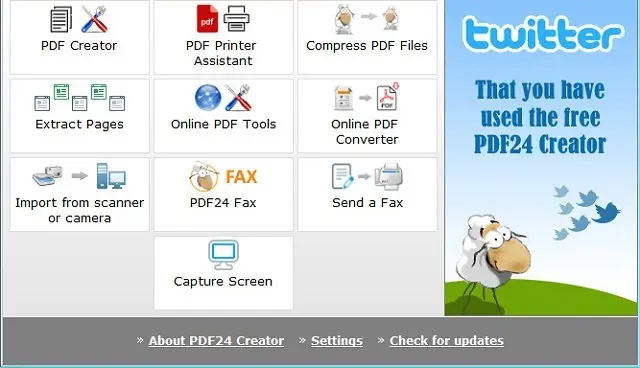
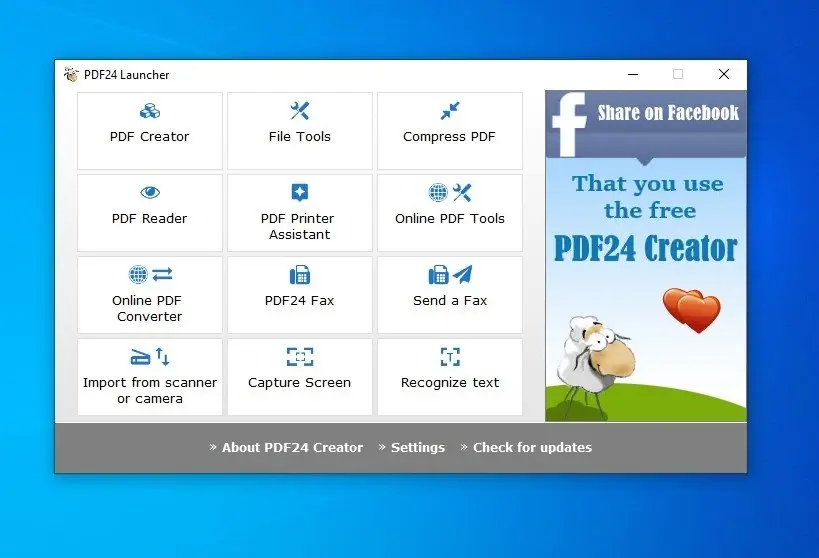
How Does PDF24 Work? Step-by-Step Guide
PDF24 is simple. You do not need to be a tech expert. Here is how it works:
- Go to the website Open your browser and visit pdf24.org.
- Choose your tool Pick the tool you need. For example, click “Merge PDF” if you want to combine files.
- Upload your file Drag and drop your PDF onto the page, or click to browse your computer.
- Process the file Click the button to start. PDF24 does the work in seconds.
- Download your result Save the finished file to your device. Done!
That is it. Five steps. No account needed. No software to install.
Is PDF24 Really Free? What Is the Catch?
Yes, PDF24 is genuinely and completely free. There is no hidden catch. Here is the business model:
- PDF24 earns money through advertising on its website
- There is a PDF24 Creator desktop app that is also free
- Businesses can buy a PDF24 business plan for teams, but individual users pay nothing
- No watermarks.
- No file size tricks.
- No “free trial” that expires.
- The free version gives you full access to all tools.
Is PDF24 Safe to Use? What About Privacy?
PDF24 takes privacy seriously. Here is what happens to your files:
- Files are uploaded to secure servers over an encrypted (HTTPS) connection
- Your files are automatically deleted from the server after a short time
- PDF24 follows GDPR regulations because it is a German company
- The company does not share your files with third parties
For extra privacy, you can also download the PDF24 Creator desktop app. With the desktop app, your files never leave your computer. Everything happens locally on your device.
How Is It Different from the Website?
Here is what makes it special:
- It installs a virtual PDF printer on your computer
- You can print any document to PDF from any app (Word, Excel, web pages, etc.)
- It works completely offline no internet needed
- It is 100% free and does not expire
The Creator app is perfect for businesses and users who handle large numbers of files every day.
How Does PDF24 Help Businesses and Professionals?
PDF24 saves businesses time and money. Here is how professionals use it:
- Accountants use PDF to Excel to pull financial data out of reports
- Lawyers use PDF password protection to secure sensitive documents
- Teachers use PDF merging to combine lesson handouts
- Realtors use the PDF sign tool to get digital signatures on contracts
- Freelancers use PDF compression to email large design files
- Healthcare workers use the redact tool to hide patient information
How Does PDF24 Compare to Other PDF Tools?
Many PDF tools exist. Here is how PDF24 stands out:
| Feature | PDF24 | Adobe Acrobat | Smallpdf | ILovePDF |
|---|---|---|---|---|
| Free tools | 25+ | Limited | Limited | Limited |
| No account needed | ✅ Yes | ❌ No | ❌ No | ❌ No |
| Desktop app | ✅ Free | 💰 Paid | ❌ No | ❌ No |
| Watermarks on free | ❌ None | ✅ Yes | ✅ Yes | ✅ Yes |
| File size limits | Very generous | Strict | Strict | Strict |
| GDPR compliant | ✅ Yes | ✅ Yes | ✅ Yes | ✅ Yes |
| Price | Free | $20+/month | $9+/month | $6+/month |
PDF24 wins on price, tool count, and ease of use. It is the top free alternative to Adobe Acrobat.
What Makes PDF24 the Best Free PDF Tool Available?
PDF24 earns its top rating for five main reasons:
- It is truly free. No trial. No expiration. No watermarks. Full access to every tool for everyone.
- It needs no installation. Open a browser, use the tool, download the result. That is all.
- It offers more tools than any competitor. Twenty-five plus tools cover every possible PDF task.
- It is secure and private. German-based, GDPR-compliant, and files delete automatically.
- It works on every device. Windows, Mac, Linux, iPhone, Android — it works in any browser.
Can I Use PDF24 on My Phone?
Yes, PDF24 works on mobile devices. You can access all tools from your phone’s browser.
For iPhone and Android users:
- Open pdf24.org in Safari or Chrome on your phone
- All tools work just like on a desktop
- You can upload files from your phone’s storage, Google Drive, or Dropbox
- Download results directly to your phone
How Does PDF24’s OCR Tool Work?
OCR stands for Optical Character Recognition. It is a technology that reads text from images and scanned documents.
Here is how PDF24’s OCR tool works:
- Upload a scanned PDF or image file
- PDF24 analyzes the image and detects text
- It converts the image into a searchable and copyable PDF
- You download the finished document
This tool is perfect for digitizing old paper records, scanned receipts, or photos of documents. It supports over 100 languages.
What Is the PDF24 Business Plan? Who Needs It?
The PDF24 Business Plan is designed for companies and teams that use PDF tools at work.
Business plan features include:
- Higher file size limits for large documents
- Priority processing — faster results during peak hours
- Team collaboration features
- Advanced API access for developers
- Dedicated support from the PDF24 team
- No ads on the platform
Individual users do not need the business plan. The free version handles personal and basic professional use perfectly.
Final Thoughts: Why PDF24 Is the Ultimate PDF Solution
PDF24 free latest version truly lives up to its name it offers solutions for all PDF problems, 24 hours a day. Whether you are a student, a small business owner, a teacher, a lawyer, or just someone who needs to send a signed document fast, PDF24 gives you the tools to do it. For free. Right now. No signup required.
It stands as the best free alternative to expensive PDF software. It beats competitors on tool count, price, privacy, and ease of use. Its combination of an online platform and a free desktop app makes it unique in the market. If you deal with PDF files in any part of your life, bookmark PDF24 today. It will save you time, money, and frustration every single time you need it.